Wedding photography – Retouching & style
My style in wedding photography veers towards the more straight-forward image – uncluttered and without much Photoshop work done. I really believe that the more you fudge with a photograph, the more likely it would not be as timeless as you might want it to be. Retouching styles become dated. So I tend towards the more straight-forward rendition of a photograph. That said, you can most definitely enhance the original photograph to make it really pop.
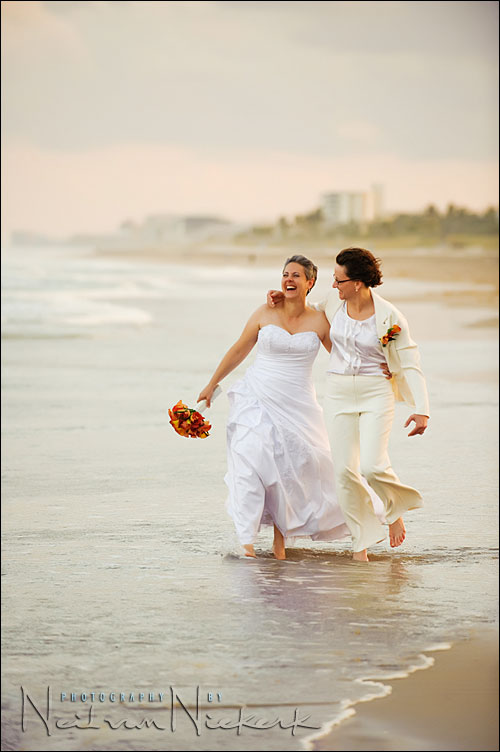
Here is an example – a favorite image from a sequence taken during the romantic portrait session after a wedding. The wedding took place in Florida. As a wedding photographer in New Jersey, it is quite a treat to do a destination wedding – someplace a little more exotic than the Garden State. Not only was it a destination wedding in Florida, but this also happened to be the first time that I photographed a same-sex wedding. And I felt particularly honored to have so much faith placed in me with a special event like this.
The reason why this image is my favorite is that it shows a wonderful couple together in a spontaneous moment. It is very much *them*, and I am sure their friends and family will instantly recognize this image as capturing the essence of who they are, and how they are.
This is where a lens like the 70-200mm f2.8 is essential .. it allows breathing space between you and your subjects. The light is all available light. No flash necessary with the soft early evening light.
But I did a little bit of work on the image in Photoshop, so let’s see how I got there ..
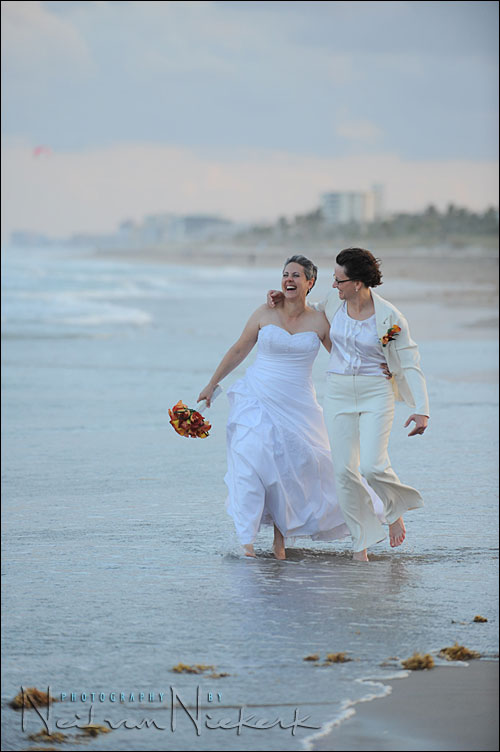
Here is the image directly out of camera. To get this, I extracted the embedded JPG from the RAW file using BreezeBrowser.
The first thing you’ll notice is the strong blue color cast because of the late evening. Even with my WB set to Cloudy, it is still too cold. But instead of wasting time messing around with the white balance settings, I accepted this .. and knowing I have the leeway with a RAW file, I just got stuck into the actual job of photographing the couple. I could always fine-tune the WB later to my liking. And my liking is a much warmer color balance, as adjusted in ACR / Bridge …
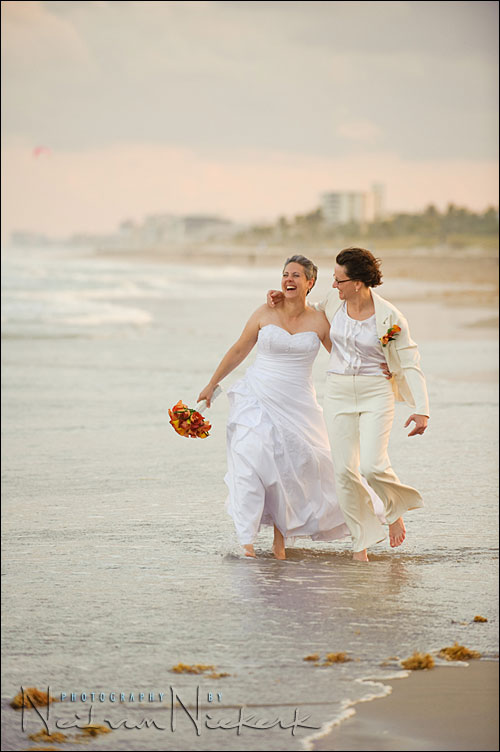
With this I would like to labor a small point again. I am often asked what White Balance setting I am using, or used in an image … but really, it isn’t of much consequence. Rather concentrate on the moment .. the lighting .. reacting to what you’re seeing .. than getting stuck into specific Kelvin settings during the photography session.
Which does briefly bring us to the technical details:
Nikon D3; Nikon 70-200mm f2.8 AF-S (B&H)
1/500th @ f4 @ 500 ISO … but exposure was pulled up 0.5 EV in post-processing the RAW file.
Back to the image .. now you’ll notice that compared to the original, I cloned out all the seaweed. That’s just visual clutter distracting from the couple. I also removed a hint of red in the clouds to the top left in the image. It kept pulling my eye away .. when I really wanted attention on the bride’s expression.
Then with those details taken care of, I wanted a bit more snap to the image. The previous post on this blog touched on this topic .. making the image pop a bit more, and for this image, I used a different technique.
I created a duplicate layer on which I ran a softening plug-in -Portraiture by Imagenomic. I used it at the default settings. Simple. There are hordes of other actions and plug-ins available to soften an image.
But what I really was after was some snap to the image. For this I used an amazing piece of software – Topaz Adjust (Topaz Labs). (And as software goes, it is quite affordable.) I ran Topaz Adjust on another layer, and then set it to Soft Light blending mode. Very similar to that previous article on making an image more vibrant.
And there you have it .. the final image that I am very proud of.
What a gorgeous image! Thank you for sharing your process!
Gorgeous image! What joy on their faces.
Hi Neil,another great photo as usual…you rock :)
One question,if I may ask: how do you deal with noise?.If I go higher than 800 ISO on my Canon Powershot SX10,I get rubbish.No way trying to set 1600 ISO,or so.You must been using good lenses [or camera] then.
Thank you for your efforts and lessons!
Awesome picture and kudos for sharing how you got the final image!
Have you tried the D3S? It’s got even better high ISO’s, the 12800 looks like the 1600 on my d300. Shots on 6400 with D3 and D3s are much cleaner on the latter..
Also, how much instruction do you give your subjects? Did you just tell them to
1. “walk towards me” or
2. “walk towards me with your arms around eachother” or
3. “walk towards me with your arms around eachother laughing while you look at her and she looks at the horizon”
4.or “walk towards me, with your left arm around her waist, just enough so I can see your hand while holding the bouquet 10 cm’s from your waist pointing in a 45’angle downwards while holding your head just a bit backwards with an open mouth and squinted eyes. I want you to put your right arm over her shoulder and hold your hand next to her face while looking at her teeth and keep your other arm in a 45′ angle downwards so your jacket falls open and I can see her hand around you waist” ?
Thanks again!
Thanks for your response, setting up engagement sessions may indeed be a good idea…
Food for thought :)
Joost
And nice tai-chi picture :)
Hi Neil. Beautiful image of the couple on the beach. You obviously had great luck using Imagenomic’s Portraiture 2 software. Regarding Gorka’s question about noise, she should try Imagenomic’s Noiseware Pro software. With the same single-click ease you used with Portraiture, Noiseware will also produce amazing results with her Canon PS SX10 or any other camera.
Neil,
Nice job on the final picture, I love it.
I have a question, which is unrelated to this post, maybe you could even dedicate another post/page to this but which Photoshop plugins do you have and which ones do you use the most?
Awesome blog, I learn a lot from your articles.
Peter
Neil, thank you so much for the reference to topaz adjust. And a great tutorial on the photo. To often, teachers show us the final product without giving us the workflow.
BTW — over the brides right shoulder on the shoreline — is that a blob of sensor dust? :)
Wonderful, beautiful photograph, Neil and kudos for you for showing out-of-camera images as not many pros would do that for risk of looking mediocre ;-) I’ll be doing a post on my blog later today about the making of this photograph including what came out of the camera (18+)
I want Topaz Adjust so badly, but it only runs on an Intel Mac and my wife would kill me if I dropped another $5,000 on anything remotely related to photography ;-)
Neil,
It’s just amazing the number of Photohsop/Lightroom plug-ins available for photo adjustment. I’m actually overwhelmed. I just want one set of software and run with it. Otherwise, we would all be switching/upgrading software like we do with camera equipment.
@Neil on the “blob” — sorry about that. On the plus side — that’s some great bokeh! :)
Mac,
Topaz Adjust is $50. Surely, you have a budget for that. :-)
Lovely picture, it really does seem to capture their essence!
Stephen,
Topaz Adjust only runs on an Intel Mac. I have the older PowerPC processor. Alas, it will have to wait until I upgrade computers.
Neil,
Do you bring all your images through Photoshop or do you leave some as-is after Raw conversion?
@Lou,Gorka is basque for George ;).BTW,I often use Noiseware,a great piece of software for noise reduction.Hijgly recommended.
@Neil,thanks for your quick answer,and I’ll pick a decent DSLR next time I change my camera.Do you have any plans on coming to Spain to give us a seminar?.I look forward to your next book [or DVD],and I’m sure I’m not the only one :-).
Hi Mac,
I misunderstood. I didn’t realize that you only had a PowerPC processor. I didn’t make the connection that the “IntelMac” reference meant that you had to buy a new computer. Buying a new computer would be a problem. :-)
–Stephen
@Gorka If you go for a cheap DSLR like the Nikon D90, you will have NO visible noise at up to ISO1600. Best bang for the buck, and it has flash commander etc all built in, unlike the more expensive Canons.
Stephen,
Yes, indeed that was the inference I was making ;-)
I managed to achieve a similar result using Capture NX – took me 10 minutes to reproduce most of the effect. Check it out!
http:\\www.goodstockphotos.com\tests\LK-2555-orig_CaptureNX.jpg
Some extra effect
http:\\www.goodstockphotos.com\tests\LK-2555-orig_CaptureNX_Extra.jpg
Great capture Neil!
@Sasha,thanks for the advice,I have a very good opinion on Nikon products.My cousin has one,he gets fantastic pics,and he’s only a beginner who only uses “point and shoot”.However,I’ve just bought a brand-new 480 EX Speedlite [thanks to Neil and the blog ;-)],so I’d rather buy a Canon DSLR.
Neil,
I love the 70-200 but use it on my d300 because of the vignette issue with the D3 – my normal combination is d300/70-200 and d3 24-70 – I keep a 14-24 and a 50 1.4 in the bag but most of the time just use the two cameras as detailed above.
can I ask how you deal with the vignette issue on the d3 /70-200 ? – I would love to use this combination in the church but dont.
I have tried it once or twice with the vignette control switched on in the camera – is that what you do ? or do you have an action to fix it in post ?
cheers
dp
Neil, what default mode on Topaz adjust do you use (micro detail enhance, or some other function), and do you end up blending the opacity of the softlight layer down around 10% or so?
Thanks for the insights into the complete flow.
How do you get such sharp focus on your moving subject
Thanks for that Neil.
I use the D700 and still find it hard to choose how many points of focus to use, to get that sharp image
Again very nice read Neil! Thanks for sharing!
Though when you refer to you camera settings in this, and most other posts on the blog I have read, you don’t mention at which focal length you are with your zoom lenses. I find it very useful information and would love to see it in future articles!
Greets
Jonas
PS: In comment 35 you do mention 200mm so I assume that was the lens setting you used…
Great picture Neil – it really catches a sense of fun and connection. Thanks for the tip about Topaz. I’ve bought it and started to play. It’s a very effective tool but I think easy to overdo the effect. I really like the subtle effect you’ve created here.
Thanks also for the tips on focus. I recently struggled when taking pictures of erratically moving street performers and lost a few shots from lack of focus. I normally use spot mode and haven’t really tried dynamic area mode. I will give it a go!
Cheers,
Eileen