Rear curtain flash sync – potential problems
With flash photography, suggestions are often given that you should use rear-curtain sync. Most often for incorrect reasons. So here is when NOT to use rear-curtain sync flash … whenever you don’t need it. Sounds confusing? Well, let me explain …
Rear-curtain vs first-curtain sync
Your camera’s shutter consists of two curtains that open, and allows the light to hit the sensor or film. This is true for all focal plane shutter film cameras, (as opposed to those with leaf shutters), and true for all digital cameras that have a mechanical shutter, (as opposed to an electronic shutter.)
To allow light to hit the sensor (or film), the first shutter opens, and then some short time duration later, the second curtain closes. Now, in using slower shutter speeds than max sync speed, most D-SLRS and speedlights allow you two points at which you can sync your flash.
You can either have your flash fire right at the point when the first shutter has opened, (first curtain sync), or juuust before the second curtain (rear curtain) closes.
This gives two different effects when your subject is moving laterally across your frame. The way the ambient blur records in relation to the flash-frozen moving subjects, looks different for those two ways of syncing your flash. If you’re photographing people (or any subject) in low light, and you use flash .. while that subject is moving, then rear curtain sync will most likely give you the best effect. (More about that in a follow-up article later on.)
However, when your subject is static, there really is no difference in how your photograph will appear .. except when you’re using TTL flash, and you’re photographing people looking at the camera.
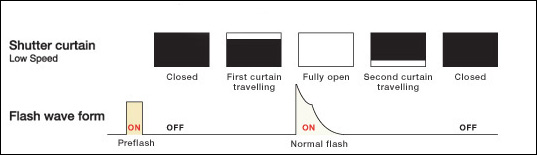
To explain why, let’s look at this diagram again:
In calculating the TTL flash exposure, the camera and speedlight emits a preflash sequence. It is from this pulse / pulses of light BEFORE the main burst of flash gives you proper exposure, that the camera calculates the TTL flash exposure.
When you’re using first curtain / normal flash sync, then the time between the preflash and the main burst are so close to each other, that you can’t distinguish the difference. It looks like one burst of light.
However, when you’re using rear curtain / second curtain flash sync, then there might be an appreciable interval between the preflash and the main burst. The slower your shutter speed, the greater this delay between the preflash firing and the main burst.
When you’re photographing people, then at slower shutter speeds, they DO react to the preflash, and most people will blink in response. The results is that you will have a greater number of photographs where people are blinking or half-blinking. Not attractive.
You can actually see this delay in the preflash and main burst:
Set your camera to any ISO and aperture.
Since this is just a test, you can set a high ISO (doesn’t matter how high), and a wide-ish aperture. f4 is good.
Set your shutter speed to 1 second.
Bounce your flash. (There’s no real reason. Just do it because it is a good idea anyway.)
Keep your flash to first curtain sync, and trip your shutter while noticing the burst(s) of light.
It will look like a single burst of light.
Now set your camera or speedlight to rear curtain sync.
– with Nikon it is usually a button on the top of your camera that you push, while rotating the dial. The button will have a lightning symbol on it.
– with Canon, it is a setting on your speedlight. It is the button with the lightning symbol and triangles. Push the button until you have to the triangles set.
You will now see two distinct bursts of light. The first is the preflash with which the camera determines TTL flash exposure. The second is the actual flash burst that gives you the exposure you will see in the photograph.
That delay causes the preflash to appear distinct from the main burst of light. This will often cause people to react by blinking.
Rear curtain flash will NOT give you better flash exposure than first curtain sync.
I frequently see advice on the forums that using rear curtain flash sync will give you better flash exposure. This simple is not true.
Summary
My advice as to when you should use rear curtain sync – use it when you have a specific reason to. Such as when you want to avoid the ghosting effect you see with movement and you’re using flash. Any other time, just use first curtain sync. You will have far fewer ‘blinkers’, and your life will be simpler.
another great article Neil.
I noticed today that not only do you know the topic, but additionally you always have all the technical terms and description correct as well. Actually remembering the correct terms is a task in itself. Always look forward to your next posting.
Thanks Neil, another great article.
Could you possibly explain about slow sync flash, I was photography a childs christening last weekend and the priest had to rush of after so turned of all the lights in the church, it was a really dark wet miserable day so to get some more ambient light for the group shots I used the slow sync flash, but my keep rate was poor due to subject movement.
I was using a tripod but went back to the normal mode again.
Aaaah, you were shooting in one of the automatic modes, and used slow-speed sync. And your camera chose a shutter speed that was too slow for your needs.
Well, that’s what you get for not shooting in manual exposure mode, where YOU choose your shutter speed. ; )
Thanks Neil, I was on manual then changed to A mode for some reason on the slow sync flash…my bad. That cleared up that problem, thanks.
Paul
Hi Neil, I just went and tried it in Manual mode there now and remembered why I chose Aperature Priority mode, its because in M mode it won’t select slow sync flash, I was using F4 at 1/20 sec, why do you think this is, oh its a Nikon D300 and SB900 speedlight?
Paul
Paul, the idea behind slow sync is that originally most cameras would default to maximum flash sync speed when you added a dedicated speedlight. This would cause a dark background in most low-light situations.
So they added a slow-sync feature to enable the camera to get to slow shutter speeds when you shoot in an automatic mode on your camera.
This is a moot point though when you’re shooting in manual mode on your camera, since you can select any shutter speed you need. Besides, in manual exposure mode the shutter speed is fixed, so by definition, slow sync mode can only work in aperture priority or program modes.
FWIW: I happen to be testing some flash settings lately, based on the Nikon CLS Guide Blog Post 17(see Neil’s blog roll) and found out that the following works for me to a large extent:
1. set camera to Manual mode
2. set shutter speed to a “non-blurring” speed – see further below
3. set aperture to a “medium-fast” number – see further
4. set/use ISO to control ambient light
On the shutter speed: I’d kick in at 1/125, which is enough to handheld for most of the shots and to stop movement in peoples faces and hands – something you’ll encounter a lot when using slow/rear-curtain sync. I shoots kids quite often and it’s difficult to keep’em still. If needed, you can drop to 1/60 or even 1/15, but mind that blur is likely to be visible.
On the aperture: I set mine to 5.6 for 3 reasons:
– 5.6 is the slowest aperture for my entire zoomrange. I use the 18-200 VR (on a D300) mainly, which is rather slow. On the 50/1.8, f5.6 is right in the sweet spot of the lens. Once set, I can forget about it while zooming.
– it gives me reasonable and constant DOF throughout the zoomrange
– at 5.6 the flash is not stressed that much, allowing for fast recycling
On the ISO: I find myself shooting at ISO 800-1600 a LOT using these settings. Basically, the flash light will *almost* become a fill, rather than the main light and the results are much more pleasing.
As you can guess by now: flash is in iTTL-mode, not manual. iTTL is forgiving for changing distances between camera and subject.
Btw, this also works excellent when simply using the built-in flash of any DSLR on the market. And 5.6 is an aperture often found on consumer lenses… illustrating that you don’t need top material to drastically improve your images.
R.
Thanks to both of you for clearing that up for me. I think I am still stuck in the fact that 400ISO is as far as i can push my camera. The thought behind this is that my camera for years has been a 20d and technology has greatly came on since that with my D300.
Thanks again to you both for your help.
Paul
Great Stuff! I love your blog, lots of great info!
Thanks Neil,
Early indications are that switching from rear curtain to first curtain sync, as per your advice in comments on earlier thread, has solved my blinking issue. Great stuff, I usually shoot with manual flash power, but it’s good to know that I can switch to ittl now without getting the problems with blinking, will probably use ittl much more in future.
Appreciate your help on this,
Marcus
If you want to avoid people blinking on the preflash: set your flash to manual, then there is no TTL-preflash.
@ Maarten, yes, and I’m comfortable doing that, but it’s also good to shoot ittl sometimes, and not have to constantly think about and adjust flash power every time the camera /flash / subject relationship changes.
Hi all! Are you really having lots of problems with people blinking? I always shoot with rear-curtain sync and I don’t notice anything out of the ordinary. For example, I assisted on two weddings this past weekend and got maybe half a dozen blinkers. For 1200 images, that’s negligible. Maybe it’s bacause I don’t shoot any slower than 1/25 or so?
Hey Neil,
What about using FEL? My experience is that not wedding photography – just general people shots and wildlife), but my experience is that front or rear sync I will still get some people with blinks, especially with some people that HAVE to blink when the pre-flash goes off. FEL or manual helps in this case.
Oh btw, I was shooting my friends at a bowling alley yesterday with your black foamie trick (I used just black cardboard as my flag) – it is amazing how I could get soft diffused shadows. Thank you very much for sharing your techniques :)
Regards,
Alvin
I am new to flash photography and I have been experienceing quite a few problems when photographing people (ghosting due to movement), even when I have the camera on a tripod. I had set the e2 setting “flash shutter speed” to 1/60 and when shooting Apeture priority was getting really crappy photos. After reading this article and the comments, now I figured out my problem, not using a “non-blurry” shutter speed, and to use manual or shutter priorty, depending on the situation. Still I got lots to learn, and if anyone has more information or a book you can refer to me, I’d appreciate it. Many thanks to all.
Aruna .. glad to hear it’s starting to come together for you.
As for a good book on flash photography? You could always check these one out. ;)
Hi Neil!
I found this blog through Google, and I have a question I think you might be able to help me solve.
I’m an party photographer. I shoot people dancing and standing around in dimly-lit night clubs which also have disco and strobe lights around the room for ambiance.
I’ve incorporated the slow-shutter speed and resulting “light trails” into my signature style. I shoot with a Nikon D7000 with a SB700 speed light with wired attachment so I can do off-camera flashes that give me more dynamic shadows.
My problem is this:
When I shoot with a slow shutter speed (usually around 1″ so that I can get lots of light trails) my flash has to fire first, and then the shutter closes a second after. The result of that is that the person I shot is lit-up first, and then the ambient light and light trails are recorded afterward, and they tend to cover-over top of the subject.
However, when I used to shoot with my old SONY ALPHA 100, I used to have a flash attachment that I would keep unattached from the camera, and I’d press the actual red “flash” button on it at what I guessed was the end of that 1″ shutter speed. It was a very weird, basic, and crude way of doing a “wireless rear-curtain sync”, but it worked when I was just starting out. The result(when I did it correctly) was a photograph where all the ambient light and light trails were recorded to the image first, and then the subject was recorded on-top of those light trails, which kept the subject’s facial features from being overtaken by the light trails. I stopped doing things that way because I had to manually focus and it took forever and the people in the clubs didn’t want to wait around while I manually adjusted my focus every time.
So, after that novel I just wrote, my actual problem is that I don’t know if there is a way to disable the pre-flash on the rear-curtain sync mode, but that is what I really need. Even if it means not shooting in TTL mode. Like the other person stated above, I get a lot of people blinking or getting confused after the pre-flash and thinking that the photo had been taken. The wired attachment I use allows me to use an infra-red sensor in my hot-shoe that will focus the subject, which is great, but is there any way that the flash can just set off one flash, at the very end of the rear-curtain sync?
Any insight you could give me would be much appreciated!
Thanks!
To avoid the pre-flash, use the flash in Auto or Manual.
I really appreciate your article very much. Only through your article did I finally find out how to set my Nikon D7000 for a Rear Curtain Synch Flash if I need it for motion blur shot. Since it is not a setting from Menu for Flash, I searched everywhere (Google, YouTube, Nikon Menu, etc), no one shows or explains where on the camera to set the rear or front curtain flash.
What is “Model Light” in Nikon D7000? Is it a pre-flash? If I turn it off, would it help to avoid the eye close due to pre-flash? If I set as Manual, will there be no pre-flash Flash? Thank you very much.
Can you speak more on your “black foomie trick” to get soft diffused shadows?
Everything you’d want to know about The Black Foamie Thing.
Great article, Mr vN.
I know that I am not meant to but I have tried both slow-synch and rear curtain synch in certain holiday situations eg with people framed against a floodlit interesting background eg the Coliseum in Rome to get both well exposed. Also, I use a relatively small aperture in ‘A’ mode such situations to maximise DoF, which then slows down the shutter speed to make rear-curtain flash effective.
Theoretically, this should produce a picture in which both the subjects and the background are in the “acceptable focus” range and reasonably well exposed.
But in practice the trouble is, no matter how much I tell them beforehand, people, especially kids, react to any flash, whether first curtain of slow-synch or pre-flash of rear curtain. And the response is usually more than just blinking. IMO, an overwhelming majority of people are conditioned to think that the exposure is complete the moment they see a flash…and start moving.
What I would like – if such a thing is possible – is a rear-curtain flash facility without the pre-flash. Then the subjects will not recognize the initial opening of the shutter and will hold steady till the flash + shutter closure.
The only way around not having that pre-flash is to use the flash in Manual or Auto mode.
That pre-flash is distinctly a side-effect of how TTL flash metering works.
Thank you. I own a Nissin i40 and Olympus FL600R but the latter is undergoing repairs as its auto zoom function is jammed rendering it inoperable. The FL600R has its own light metering sensor and a true auto mode which the Nissin i40, great flash though it is, lacks. The Nissin’s “Auto” mode is really nothing but a basic TTL function.
Hello Neil, So much interesting and valuable information on your blog, thanks for all the work and effort, much appreciated.
With regard to your earlier follower’s ‘Blinkers’ problem when using TTL with the pre-flash, I read recently on a Canon website that you can use FEL [flash exposure lock] to fire the pre-flash separately [star button on rear of my Canon 7D] the camera factors the resulting reflection light into its TTL calculation which is retained for a max of 16 sec, you therefore have this time before needing to press the shutter release to take the image. When the image is taken the camera fires the speedlite at the required output using the pre-flash data obtained earlier but this time it is a single flash. This method of using FEL to separate the pre-flash from the full flash might be a way to solve or reduce this Blinker issue, e.g. frame the shot, hit the allocated FEL button, the pre-flash fires, the Blinkers blink, the camera computes the required flash output [duration] then immediately hit the shutter release and hopefully capture the image without blinkers ruining it. What do you think, does this have possibilities?
Terry Pullen
I just wonder if people will look away, thinking the photo was taken already?
What is the best way to combine long shutter speed at night and perfectly lit subject? I don`t want to see any moving patterns from the subject. I think rear curtain speed gives you that. Should I just shoot the background with slower shutter and shoot the subject with regular flash then combine them in photoshop? or does slow sync give me that?
Hi there Beyti
I assume your subject is moving?
Then there are a few factors that come into play:
Will flash freeze movement at slow shutter speeds?
And no, rear curtain sync won’t necessarily give you sharper images than normal sync. It has to do with the timing of the movement shown with the ambient exposure, versus the flash exposure.