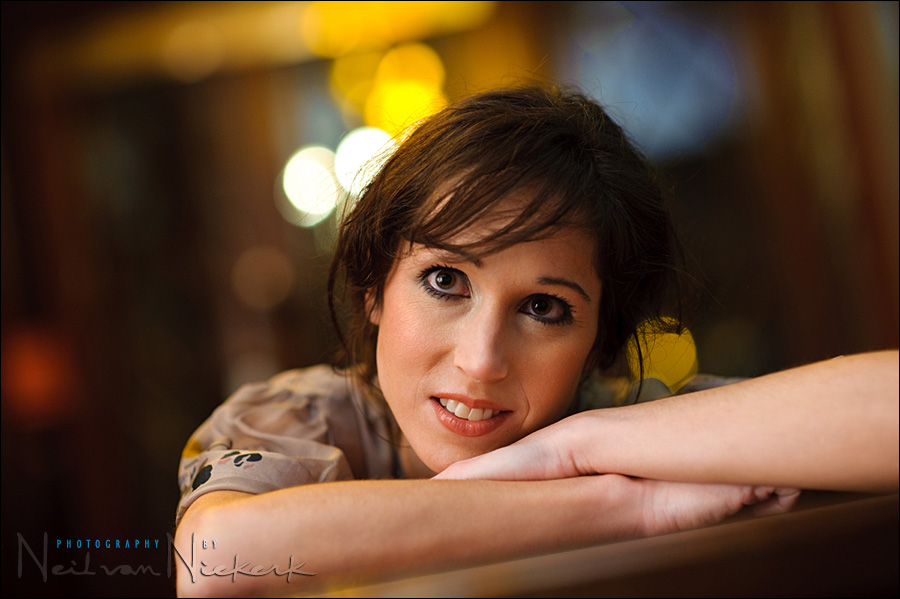
Bouncing flash off other surfaces
When I am stuck in an area where there aren’t any white or near-white surfaces to bounce my flash off, I will look around for alternate areas. In the image above, I bounced off the wood paneling and brick walls in this large enclosed entrance area of a restaurant.
As most of you already know, the problem with the bounce flash technique, is that you will pick up the color cast of the area that you are bouncing your flash off. When this color cast is slightly warm, it is often simple enough just to switch to a Daylight White Balance. This slightly cold color will off-set the additional warmth from the off-white surface you bounced your flash off.

This image will give you an idea of the color of the brick and wood that I bounced my flash off.
When an area is painted green or blue, especially a darker hue of those colors, then you will have difficulty getting a good skin tone out of the resultant color cast because you will invariably have a discontinuous spectrum. In other words, some of the colors that make up a variety of hues, will be missing. And with blue and green light, you miss out on the warm colors that make up skin tones.
This then is less of a problem when you’re bouncing off wood (especially if the wood isn’t dark), or if you bounce flash off brick walls. (Also hopefully not too dark.) The colour cast that you will get from doing so, is quite warm. Warm enough that you can often just set your camera’s white balance to Tungsten. Or around 3700K. Or there-abouts. You can dial in an approximate WB setting in Kelvin, and then fine-tune the colors as part of your usual post-processing of the RAW file.
With this kind of extreme color change, it is best that you shoot in RAW to have the data for such manipulation of your image.
Back to the image at the top .. I set my camera to Tungsten WB, which did mean the image straight out of the camera was quite close. And then dragging the sliders in ACR, it wasn’t that difficult to get beautiful skin tones. And in bouncing flash off to my left, flagging my flash with the usual Black Foamie Thing, it was just as simple to get soft directional light.
My settings where: 1/100th @ f1.8 @ 1000 ISO
So next time that you’re stumped for something to bounce your flash off, don’t be too timid to try bouncing off a warm-toned surface like wood or bricks. You might just be surprised.
related articles
- how to bounce flash
- photographing the wedding processional with extreme bounce flash
- bounce flash photography & white balance settings (model: Roz)
- bounce flash for bridal portraits (bride: Christine)
- using on-camera bounce flash outdoors at night (wedding: Jen & Chris)
hey neil,
thanks for sharing this.
Q: Did you add. gel your Flash?
I mean it makes no sense to add additional Color, because you getting some warm color from that walls.
Or is gelling also required?
thanx
peter
Hey there again Neil,
Great post again Neil. Good to know that we don’t have to stick to bouncing off white surfaces. I’m going to give this a try asap.
I presume to ask the following.
I am on a quest to get the best possible skin tones in my images. I’ve also noticed that there are some photographers out there who have the L series lenses (Canon) with wide apertures and great clarity. My question is this… does a pro lense give a person the edge when it comes to skin tones and that sort of thing. There is nothing better than great skin tone, exceptional sharpness of detail and extremely shallow depth of field and fantastic lighting.
Somehow, I’ve battled to get this combination using the middle of the range lenses. Is this true?
Also, should we “play” around with the sliders in ACR to achieve the right skin tones?
What amount of sharpening is permissable in Photoshop to enhace the clarity of an image without making it look obvious? Are there any tried and tested techniques that one could use besides just using the Unsharp Mask, High pass filter and the usual others?
Thanks for the very valuable info you share with us… Keep them coming.
While you can shoot RAW and fix in post, if time allows, why not use an Expodisc to get it correct in camera? I have found this works wonders in mixed lighting conditions.
And to think that I have been sh_t scared to bounce off bricks!! I will have to give this a go. Thanks Neil
Thanks for the post Neil. This was something I was actually wondering about.
Here’s my question though. If you adjust the WB in post, do you not risk knocking the colours off for elements of the frame which aren’t lit by the colour-casted flash, i.e. the ambient?
For the great image you give as an example that’s not too much of a problem as it looks like there’s quite a bit of tungsten in there anyway, it’s pretty dark tones and there’s not much detail to be picked out in the background. Maybe that’s the answer… this technique only works when all elements of the frame allow it?
Thanks again for the words of wisdom!
Bouncing off brick is one of my favorite things. It makes skin look so pretty in candlelight settings.
What a wonderful post…so helpful! :)
Great stuff, Neal. What would you do if you didn’t have a warm surface? The walls in our living room are green. :) Would you just use a more green WB? Would that cause a problem if the lights in the room were tungsten?
howd u get the catchlights in her eyes on this shot with the black foamie?
I never would have even considered bouncing off brick or wood before, but now the wheels are spinning in my head trying to think of a location to try this. Thanks a million for the articles, Neil (even if I am a few years late to the party)! Great info, concise and to-the-point.