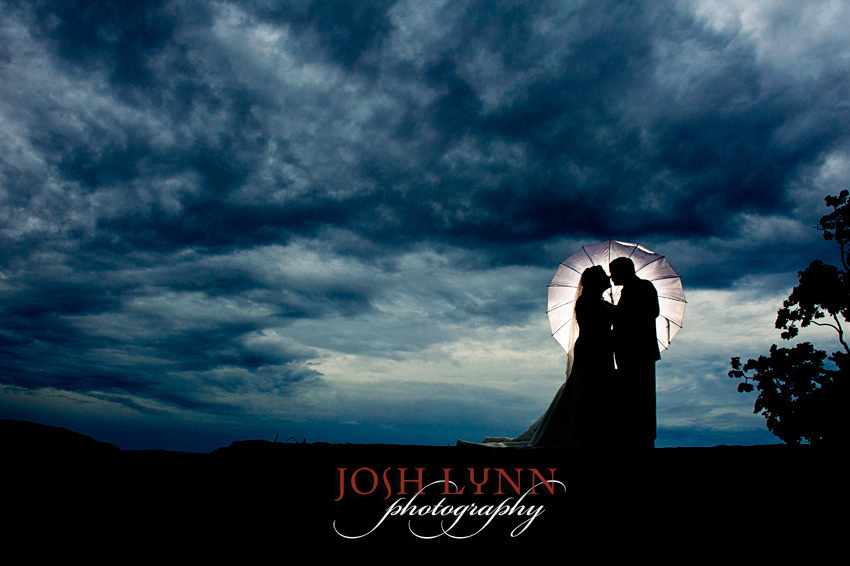
off camera flash for portraits of the bridal couple
My friend, Josh Lynn, just posted this spectacular wedding photograph. It does look like he used flash there, so I thought this would make a another good example to see if we can ‘reverse engineer’ a photograph in terms of his settings and setup.
I first had a guess at how he set this up; and then had a look at the EXIF data, and this revealed the true story. See if you can decipher this image yourself, without scrolling down at first …
My first impression and educated guess, (before looking at the EXIF data):
It does look like low light levels, with flash being fired into the umbrella the couple is holding up. Since the flash would be behind the bridal couple, I would assume a wireless transmitter and receiver being used to fire the flash.
The umbrella looks like a photographic umbrella. Look at the way the interior is drooping away from the backing at the top. That double layer says to me it is a photographic umbrella – reflective layer inside, and black backing on the outside. This would most likely make it a 60″ umbrella if I have to go by the size of it in relation to the couple.
The way the flash was triggered, makes me think it was a Radio Poppers set that controlled the Slave flash behind them. Here’s why I think the Slave flash was remotely controlled by the Master slave, and not with old school Pocket Wizard units.
For this setup, you’d either have to have done it a number of times before, so that the settings are predictable for old school non-controlled manual flash … or else you’d have to wirelessly control it from the on-camera speedlight. Since there would be line-of-sight issues, it would have to be the Radio Popper units. The other alternative – shouting instructions to an assistant crouching out of sight behind them about how to adjust the other flash – well, that just seems too inelegant.
So that would, in my estimation, make Slaved flash controlled via the Master flash on-camera, via Radio Poppers. The Slaved flash is most likely set to manual output via the Master. Of course, the slaved flash would have to be on a small light-stand. Or perhaps the plastic hot-shoe foot that the flash came with. However, there is no detectable spill – just the light in the umbrella. That would make me think the Slaved flash was on a lightstand.
Settings? It looks like low light. Therefore I would guess a slow shutter speed and a tripod. The aperture is probably a medium aperture. Perhaps f5.6 .. perhaps f4 .. somewhere there.
Then I had a look at the EXIF data:
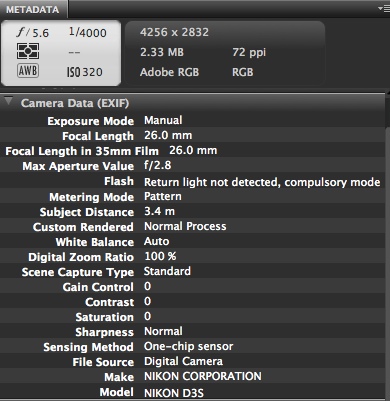
The EXIF data shows that this wasn’t low light, but very bright conditions.
If we consider the Sunny 16 Rule … bright daylight being 1/250 @ f11 @ 100 ISO … that would equate 1/4000 @ f5 @ 320 ISO
The equivalent Sunny 16 settings are very similar to what we see here. Off by 1/3rd stop in comparison. But this is an overcast day, therefore Josh’s settings of 1/4000 @ f5.6 @ 320 ISO looks about right to under-expose the sky like that for dramatic effect. Now we just need that blitz of light in the umbrella to give this beautiful silhouette shot.
Josh also sent me a second photo taken during the same session:
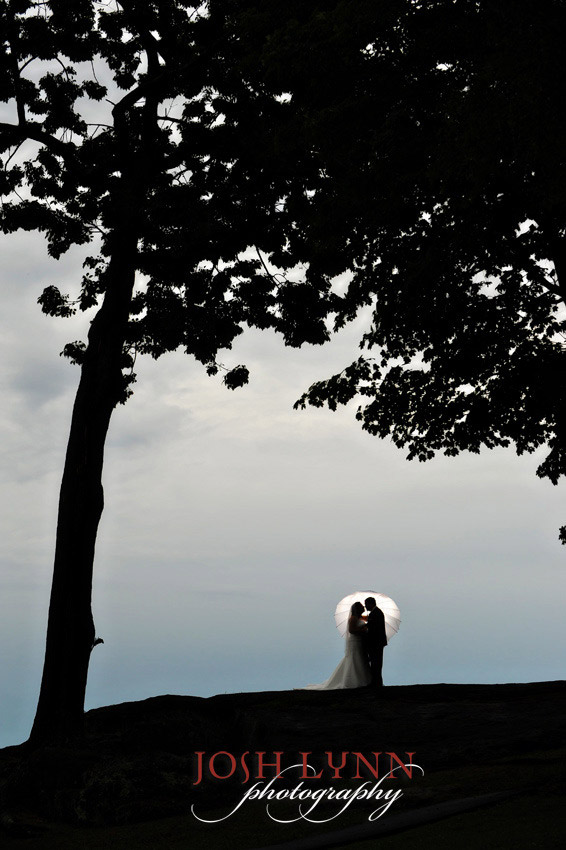
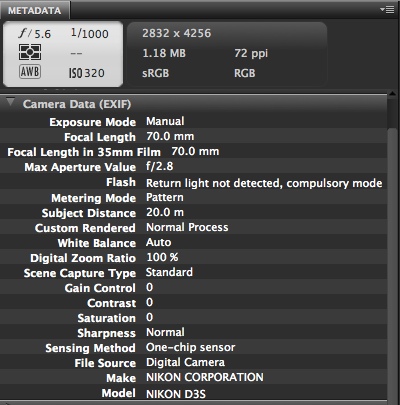
Looking at the EXIF data, we can easily see why the sky looks more neutral and less drama-filled. Josh increased his ambient exposure by 2 stops. (By dropping his shutter speed by 2 stops.)
Anyone else want to have a go breaking this down? Then we’ll see what Josh has to comment.
A beautiful shot, and not overdone, as most of these concepts are. It’s genius, really. I’ll stand back here and watch…
I like the first one.
Well regarding the umbrella I think it would have had to be a white photographic umbrella with shoot through flash, possibly shot from the ground, trasnmitted wirelessly. I think if it were bounced from the inside then the ‘ribs’ of the umbrella would have been highlighted, whereas they are silhouetted same as the subjects.
I assume it was manual flash, probably zoomed to 80+ mm or snooted so as to not directly hit the subjects at all.
Just my $0.02
Nice images by the way!
Hello Neil. Thanks for sharing this. So, for me manual flash is impossible. The exposure times 1/4000 and 1/1000 doesn’t allow to have manual flash. Or you can but you will see 50%-80% the secound courtain in the frame. It was HSS or FP (depends on the system, Canon or Nikon). Trigger system should be RadioPopper or the newest PW TT1 & TT5. The umbrella is a shoot trough one 110cm, mounted on a light stand, flash zoomed at 24mm or some. It was a bright day but not in the middle of the day, maybe somewhere around 6-7pm in the summer.
One trick is possible here to avoid second courtain into the frame. To set manual flash, exposure 1/1000, to choose a much larger and carefully composition, knowing where the 2nd courtain will be visible in the picture, and in the end you will do a big crop in PS.
See you,
M
Hi Neil, no i’m not confused about HSS and TTL. It’s not the same thing of course. I have used until now manual flash up to 1/250 exposure time, camera and flash in M, basically Canon body and SB-28’s triggered by Cactus V4. After that (more than 1/250) it was camera on manual settings, Canon flashes this time in HSS mode triggered by ST-E2, YES in TTL mode. NOW you made me curious what will happen with HSS and Manual power on flash. I believe this can be achieved only with Canon flashes and ST-E2 (or 580EX II as master). What are the bennefits in this case, HSS + manual power on flash vs. TTL? I believe that in TTL the flash based on the camera settings know how much power to give and how much pulses to cover the frame. In manual flash and HSS how it is done? How manny pulses from the flash? Or the pulses are periodic (the same distance betwen one pulse and the next one) and based on the IGBT inside the number of pulses are cutted in relation with the “power” (more manual power = more time open the IGBT = more pulses). In TTL + HSS things are different, the time (power) is calculated based on camera settings. I am sure that i cannot use HSS on my SB-28 + Cactus V4 and Canon 50D :). Now i will play all long day with manual power + hss :). Thanks
Now I’m curious too. How can you have a shutter speed of 1/1000 with a max sync speed for flash of 1/250 ? (in my case Nikon D700 + SB900)
Triggering system to allow HSS for flash. photo umbrella on stand hidden by couple, dress and bodies. Exposure taken for background and dropped by whatever pleased Josh.
Flash gun held by one of the couple and pointed into the umbrella – take shot, chimp, adjust flash power, take shot, chimp.
My thoughts on this – since the flash is not lighting the entire image, the sync issues don’t matter. Ambient is the main source of light, and the flash is only illuminating the umbrella – a very small part of the final image. So you don’t see the curtain at all.
I spent all the day thinking why did he choose to go into HSS with that 1/4000 F5 ISo320 if it is possible to go into max normal sync speed at 1/250 f11 ISO100 ? What are the bennefits here? At the 1/250 we can have the max range for the flash. I think this is a good question, i believe. This is my last post for today, sorry for disturbing you so much but this question has captured all my day. regards
I don’t think the groom is holding a flash based on their posture, although it is possible. Maybe the flash would be on the opposite side of the umbrella instead of inside it (the umbrella is acting like a softbox baffle)?
I’m thinking some sort of hot light, flashlight or L.E.D. perhaps. No sync required!
I think its a shoot trough umbrella, I agree with Owen. If you look at the ribs and at the strap (right side of umbrella) If it was a reflective umbrella, the strap would have lighten up. In think its a basic flash & Stand combo, no assistant holding the flash.
I am not so sure on the power setting on the flash. If I had to try this shot from this photo, I will start with my flash in HSS, manual mode on half power, and then step down on the power if need be.
I do however think, that Josh had played around with the skies in a editing program on the first photo to bring out more detail and color.
An awesome photo!!!!!! And I just want to try this now
HaHaHa I got it all wrong.
Thanks for Sharing Josh
Hi Neil. Like you I would guess the flash was between the umbrella and the couple, not behind it. If the flash were behind it I think the falloff above the couple would not have occurred the way it did in the first or second shot. Plus that black backing would not have been easy for the flash to penetrate (I would think Josh would have removed the backing if the flash was firing from behind the umbrella).
I agree the flash was likely triggered by radiopopper. In the first shot, it is possible to use nikon cls awl. Although the flash is blocked by the couple, in my experience, the umbrella appears to act like a satellite dish to collect light and focus it on to the flash (assuming the flash is near the umbrella’s axis). One of these days I’ll test that theory. At a distance of 3.4m in overcast conditions I think nikon cls awl would not have any problems triggering. In the second shot however, which I assume was triggered similarly, the couple was 20m away. In daylight that would have been at the edge of what I’ve seen cls awl can do, making the radiopopper more likely.
Best regards,
Michael
I have a question about Josh’s comment regarding normal sync vs. HSS: “for an image like this I would need my Quantum or 2 speedlights to compensate for the amount of ambient.” I thought that HSS was only useful for reducing depth of field (by allowing use of higher shutter speeds and thus a larger aperture) but not for killing high ambient light because it greatly reduces flash power. Wouldn’t the effective flash output be the same whether shot at 1/250th f/22 or 1/4000th f/5.6? (Maybe I’m wrong and flash output doesn’t decrease at a 1:1 ratio with increasing shutter speed).
Hi Josh,
Really like the first image, very atmospheric! It looks like a book or DVD cover for a romantic story/film.
Thank you for sharing your images and how you produced them.
David
So, John Lo, the assistant was behind the umbrella, like this?
John Lo with SB-800
|
Umbrella and stand
|
Couple
|
|
|
Josh
Does that mean I actually got something right?
With HSS the flash is set to a successive series of pulses at very high speed. As there is no effective ‘sync’ with the camera as such you dont have a max sync speed nor the shutter block/curtain effect on the image…as far as i know?
Regarding Michels comment, you will only really get falloff on the couple once the flash is at a certain power. As well as this, the flash is only aimed and zoomed/snooted at the umbrella not at the couple so i stil think it was shoot through.
Oh i just saw Josh’s comment oops!
Well at least it was a shoot through rain umbrella! :D
Thanks for sharing Neil and Josh. Would love to see more of these reverse-engineering posts :)
The second image is just stunning – looks quite oriental with the unbrella & that fabulous tree framing the subjects. Thanks so much for sharing the shots and info with us.
Great shot. My guess is that he would have used a white balance to create the bluer than blue sky, then gelled the flash so the couple was in a ‘normal’ color cast.
richp beat me to it – I was going to say CTO gel to make the sky blue.