Nikon focusing modes – Nikon D300 / D700 / D3 / D3s
The current line-up of top Nikon D-SLRs offer a range of AF settings. The combination’s in settings seem daunting at first. But with other settings on my D3 bodies, I keep it fairly simple. Instead of flip-flopping between numerous settings, I keep it simple by generally using the AF settings in just two ways. This depends on what whether my subject is static or moving.
First of, we’re keeping manual focus out of this discussion. If you need to focus in manual for some reason, eg, doing macro work, the choice to do so will be for obvious reasons – you’re in a situation where you don’t need AF, or the AF doesn’t respond properly.
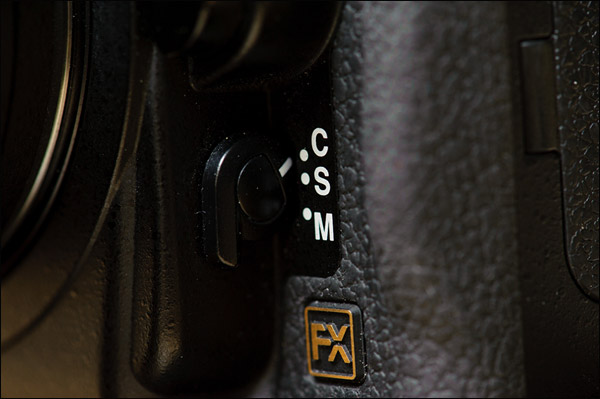
Then your choice of AF mode starts at the moment you decide whether you need to shoot in either Continuous-servo (AF-C) or Single-servo mode (AF-S). This however, depends on how you use your AF-ON button / Back-Button Focus.
Back-Button Focus / AF-ON button
We need to realize that focus initiation isn’t really connected to the moment that you need to trip your shutter. For example, with sport, you might track an athlete’s movements, but only fire the shutter some (short) time later at the peak of action.
Generally, with a static subject, and using default settings, a photographer might only use the center AF button, since it is the most sensitive AF sensor. Then the general way of using AF would be to focus by gently touching the shutter button. This initiates the auto-focus. You’d keep your finger lightly on the shutter button until focus has been achieved. Keeping the shutter button lightly depressed, you’d then lock the AF setting and recompose your framing of the intended image … and then only trip the shutter.
Okay, that would be the general default way of using AF on a camera.
This however, would make a sport photographer or action photographer’s life difficult, since they are photographing moving subjects. You can’t lock focus and then take the shot … for your subject has surely moved by then. So the moment you photograph action or moving subjects, it makes sense to be in the Continuous-servo (AF-C) mode.
There is a hiccup now for the action / sport / news photographer who uses the shutter button to do both functions – initiate focus AND trip the shutter. Let me explain: let’s say you’re using AF-C mode, tracking movement … but then need to photograph a static subject, and need to recompose the photograph and not just have a central composition. Now the photographer would need to change switch settings, moving from AF-C to AF-S, and then change the way to lock and hold focus. It becomes a clumsy way of working.
Instead, the vast majority of action photographers would use Back-Button Focus, ie, the AF-ON button to initiate focus … and then use the shutter button purely just to trip the shutter. This now becomes a separate action – thumb on the AF-ON button to initiate focus, and the fore-finger on the shutter button to finally trip the shutter.
There’s now an added benefit. If the action photographer wants to hold / lock focus, they simply let go of the AF-ON button. The camera will now not focus the lens, and the photographer can trip the shutter to take the photograph. So with this simple change in settings, the action photographer is instantly ready for movement (AF-ON button depressed), and the moment the photographer wants to lock focus, they just let go. Beautifully simple.
However, I don’t use Back-Button Focus. I just couldn’t quite adapt to it. I use the AF-ON button to lock & hold focus when I am shooting in AF-C mode. Beautifully simple … except that I have to flip back to AF-S mode when photographing static subjects.
There is one small gotcha with using Back-Button Focus – the Vibration Reduction (VR) function doesn’t kick in with the AF-ON button, but only when the shutter button is pressed. So you might encounter situations where the VR hasn’t had time to settle before the shutter is fired. It’s just something to be aware of.
Continuous-Servo (C) vs Single-Servo (S) focus modes
How you use AF-C mode versus AF-S mode will then obviously depend on whether you use Back-Button Focus (BBF).
If you use AF-C mode with Back-Button Focus, then there is less motive to use AF-S mode.
If you don’t use BBF, and still prefer using AF-C primarily, then you could use the AF-ON button to lock focus. That would work as well. But ultimately, you would then still be better off using BBF if you shoot mostly (or only) in AF C mode.
If you use AF-S mostly, then you could use BBF. It would make sense to do so. But not much more than just using the shutter button to initiate AF and fire the shutter. I believe that BBF really comes into its own if Continuous-Servo mode (AF-C) is your primary focus mode.
This of course brings us to …
Release priority vs Focus Priority
With Nikon D-SLRs, the defaults are:
Release Priority (custom function a1 on the Nikon D3) for AF-C. This makes sense in that you really want the camera to be able to track focus and you can fire shots off, relying on the camera’s AF technology to give you the edge here and enough in-focus images for a moving subject. If you were to set Focus Priority, the camera would only fire once it has confirmed your subject is in focus. That delay would mean your fast-moving subject is already out of focus again … even for a Nikon D3.
Focus Priority (custom function a2 on the Nikon D3) for AF-S. This makes sense, in that with single-servo mode, you’re most likely focusing on static subjects. Best then to make sure your image is crisply in focus before the camera allows the shutter to be tripped.
You could swap these settings, or change them from the defaults, but this doesn’t make much sense to me.
There is of course (Release + Focus) Priority as an option for custom function a1, in which the camera slows down the frame rate in AF-C mode to give the camera better chance to follow focus. This also seems a good option for those photographers who shoot a lot of action. Your choice between Release Priority, and Release + Focus Priority will then obviously depend on your needs.
Which now brings us to …
Auto-focus (AF) settings for Nikon cameras
AF Area Modes – Single-Point AF
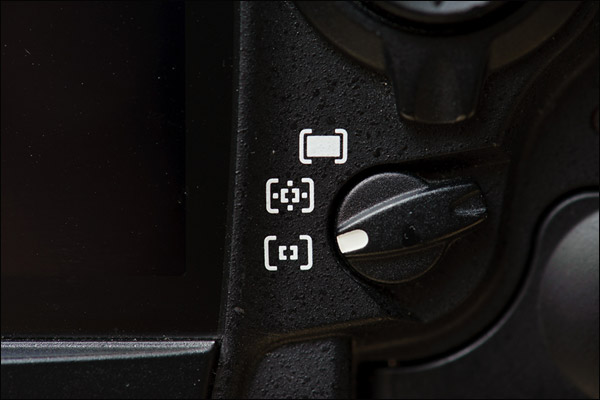
With this, the photographer manually selects the focus point. The central AF sensors are more sensitive. I must admit that I don’t trust the outer AF sensors to give me accurate focus on the Nikon D3, and I rely heavily on the center AF sensor when focus is critical.
AF Area Modes – Dynamic Area AF
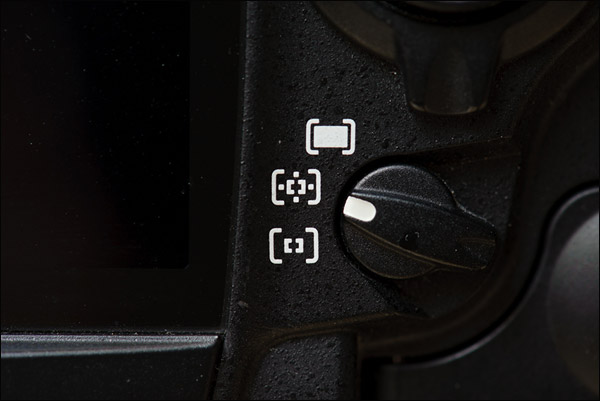
Now we’re getting to the area where Nikon D3 focusing capability starts to become magical.
Via custom function a3 on the Nikon D3, you can select whether the camera uses 9, 21 or 51 AF points … or 51 points with 3D Tracking. This is where the Nikon D3 (and the other Nikon D-SLRs with 3D Tracking really shines. If you set your camera to AF-C, and have 3D Tracking enabled, your camera will jump to other AF sensors as your subject moves across the frame. It really is quite incredible to see … and then realize the camera mostly nails it.
AF Area Modes – Auto Area AF
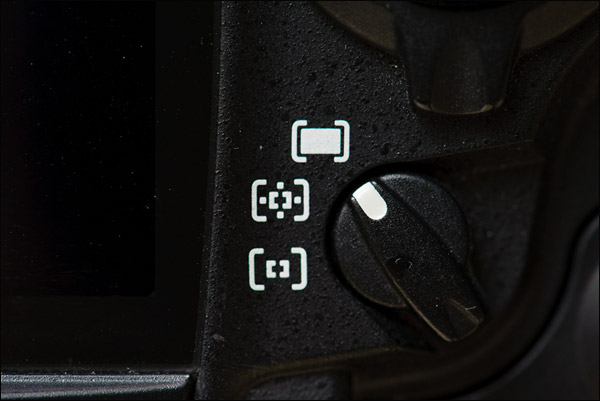
The camera is purported to distinguish human subjects from the background. I have no reason to disbelieve the camera manual on this, but I am perhaps too much of a control freak … I like to see and control which AF point the camera is using. In AF-C mode and Auto Area AF, the camera doesn’t show which AF points are used. (It does so for AF-S mode though.)
And this all finally brings us right back to …
My choice of AF settings on Nikon cameras, specifically the Nikon D3
In summary: Even though the D3 is a camera that can be customized in an astonishing number of ways, I tend to keep my operations and functions quite simple. Predictable. I don’t jump between numerous settings and options. I tend to keep to one or two basic ways of working, and make sure I get a feel for how the camera works and responds with that. For example, I don’t jump between exposure modes. I pretty much stay in Manual Exposure mode. Similarly, I don’t use Auto ISO. It brings in another variation in my controls.
In the same way, I mostly use these two auto-focus setups with the Nikon’s:
Static subjects:
I’m mostly a focus-and-recompose shooter. I like AF-S (Single-Servo focusing mode) and the central AF sensor. I do move the AF sensor to the other sensors in proximity to the central sensor .. but I mostly work in AF-S mode, and the central AF sensor. And I use the shutter button to initiate AF and trip the shutter. Basic settings really. I lock focus with the AF-ON button, so that I don’t have to constantly refocus on a static subject.
Action & movement:
When I do photograph action of any kind, I change my camera to AF-C and the Dynamic Area AF selection, with 3D Tracking enabled via custom function a3. Still using the shutter button to do everything. If I need to lock focus, I use the AF-ON button to hold focus.
Related articles
- Camera settings & custom function settings for the Nikon D700
- Camera settings & custom function settings for the Nikon D3
And just as proof that you have to change things up – this weekend I photographed my one client’s kids, and this little character was zipping around like crazy.
My usual way of using Servo (AF-C) with Dynamic Area AF, had the camera picking up other areas to focus on than his face. So I changed to Single Point AF, and moved the sensor to the one that is about at the right height for his eyes in the frame – whether full-length shot or tighter portrait.
I had a much better success rate with these settings during this shoot, than with Dynamic Area AF.
Thanks for this fantastic focus information. I am the photographer for the Junior de Montreal of the Quebec Major Junior Hockey Leaque. Our team this year is predicted to be the best junior team in Canada with players like Trevor Parks (drafted by Minasota) and Louis Leblanc ( drafted by the Montreal Canadians ).These and 4 other drafted players are destined for the big time the NHL.
Your post on focusing will help me as the game is just so fast and great shots that are not sharp really bother me. I will experiment at tonight’s game with the Back-Button Focus. I like yourself am just not comfortable with it.I did not know that releasing it would lock focus. I have spoken with sports photographer Dave Black and he suggested using 51 point 3D tracking but I and about 6 pro shooters at each game tend to stay away from it. They contend that the game is just too fast for that setting and recommend 9 point single point focusing.
Thanks again for a really great article on focusing I was so glad to see it ( rather than another exposure article) I am looking forward to your next book coming out soon and perhaps videos in the future. I plan to be in Vegas attending the WPPI in 2012 and hope you will be asked back
Ron .. re “another exposure article” … I have the intention to move to a much wider range of topics, and had hoped that the previous article on apertures, shutter speeds and ISO settings would be the final one. That we’d be done with the topic more or less … but still there are questions, and a lot of response … so I have to follow that. : )
Hello Neil.
So with Action and movement you have 3D tracking all the time? I am always disturbed by focusing points jumping all around and I am never sure my D700 will get what I want in focus. Although I guess it is just useless fear.
Definetly I will have to read this one again and again. This is still blurry page of my D700. Just can’t get this lesson through. Thanks for sharing.
Saso .. I wouldn’t see my take on this as The Definitive Answer. That’s why I tried to explain my choices in terms of a wider range of possibilities. It is just how I do things at the moment.
Neil – I am a wedding photographer in Scotland, and use the same set up as you! Except that I use the preview button for focus lock in af-c mode. It’s a bit clumsy – so how do you use the af-on button fo focus lock when you’re using the shutter button to activate focus? Is it a menu item available on the D3 and not the D700? On the D700, if you assign focus activation to the shutter button, the af-on button is still active…..
It is a combination of settings:
On the Nikon D3:
cf A9 = AF-ON button set for AF Lock only
cf A5 = AF Activation is set to Shutter & AF-On
This then works that the shutter button is the one to initiate AF, and the AF-ON button doesn’t.
Going through the menu for the D700 now, it seems it doesn’t work that way, except if you have the MB-D10 and shoot verticals. Then the AF-ON button can be set to be just AF Lock.
This is an odd thing about the D700 then, that you can’t set the AF-ON button to do something else.
I hope this makes sense.
Neil,
I’ve never done focus on subject + recompose, so this may be a silly question.
When you lock the focus with the AF-ON button (i.e. somebody’s eyes) and then recompose, I presume that you cannot move from your current position. If you move, the distance to your subject (i.e. the eyes) will change, so the camera’s AF lock will now be focusing at the wrong distance. Correct?
I have used the outer AF sensors on my D700 often, but I do notice that it doesn’t always nail my subject’s eyes 100%.
Neil, thanks for the post.
Here is a link to Nikon’s official Technical guide for autofocus for the Summmer and Winter olympics for the Nikon D3s (it would apply to the d700 and d3 also). Great stuff. It shows different scenarios (say snowboarding, skiing, figure skating, summer track, etc) and what kind of focus modes you should use (9, 21, 51, etc)
Neil,
I found an article about the possible failings of focus and recompose: . I’m not sure if you ever experience this.
I can’t edit my post, but I read another article, which provides some mathematics to focus and recompose. http://www.bobatkins.com/photography/technical/focus_recompose.html Basically, you have to be aware of your depth of field, field of view, and distance to focus subject. Focus and recompose can result in misfocus or noticeable soft focus if your lens is wide open (i.e. shallow depth of field), and you are close to your subject. As you move further away from your subject or have greater depth of field, focus and recompose will have less noticeable soft focus (if noticeable at all). You’ll never have “perfect” focus on your intended subject with focus and recompose, but this article’s information should minimize problems.
Indeed, it is a dicey thing to focus + recompose with a thin DoF .. but this depends on the lens design, and whether the plane of focus is curved or not.
I noticed this again in my comparison between the Nikon 85mm f1.4D and Nikon 85mm f1.4G.
Hi Neil, great article.
I have a question that’s always puzzled me about the single point AF versus the dynamic point AF switch. Like you, for static subjects I use the AF-S mode and focus priority whilst for moving subjects I use AF-C mode and release priority. However I normally keep my AF-area mode swich set to Dynamic Area AF whatever I’m shooting as this seems to work equally well in both AF-S and AF-C modes. Is there any good reason to swich to Single Point AF when shooting in AF-S mode?
John, when you’re in Dynamic Area AF, and the camera can’t lock focus easily with the center AF sensor (or whatever your active AF sensor might be), then it uses the adjacent AF sensors. This can lead to slight mis-focusing.
eg, you are trying to focus on someone’s eye, but the camera instead grabs the eyebrow.
So I stil prefer Single-Point AF point when focus is critical.
Hi Neil,
Back-Button Focus (BBF) and AF-ON are the same?
When not, what is the difference?
Thanks,
Balazs
The AF-ON button can be configured to do any of a variety of functions, and not necessarily be the BBF button. So it depends on how you set your camera up.
So in my case, my AF-ON Button is used only for focus lock / hold, and doesn’t work as a BBF button.
Hi Neil, just a quick question. You wrote: “I’m mostly a focus-and-recompose shooter. I like AF-S (Single-Servo focusing mode)…” Does this apply to your weddings too? What I mean is, Bride and Groom are hardly fast moving “objects”, but do you use focus and recompose in AF-S when they walk down the aisle, or first dance etc.
These are movements too – not the fastest, however still movements.
Andreas, you’d be surprised how fast a nervous bride or bridesmaids can zip down the aisle.
Again, I don’t keep to one specific do-all method. I usually work with the Single AF mode (AF-S) and SIngle-Point AF .. but I change it up to AF-C and Dynamic Area AF if I need to.
Neil,
One feature that hasn’t been discussed here is the AF-S / Auto-Area combination.
Most of us often see this as the “dumb waiter”-mode and don’t use since we find it not flexible enough. However, one feature is often overlooked: in this mode, the camera displays the actual sensors that are used and in focus.
That means: put your camera to f/8 or f/11, focus on the scene and it will tell you what parts of the image is actually in the “projected focal field” (I hope this is clear…)
I often find myself using this when shooting e.g. 2 kids on either side of the frame while trying to get both of them in focus. Works like a charm.
@John Harris: I see no difference in AF-S / Single Area vs. Dynamic Area. In older bodies (e.g. a D70/D200), Dynamic Area would use “predictive focus” even in AF-S. But this has been skipped in the D300/700/3 models… sadly enough.
Regs,
Roel
PS: +1 for me on the AF-on button focussing. I had a lot more keepers ever since. Unfortunately, I must subtract -1 for my wife who can’t get a hold of it… ;-)
Roel … cool idea re the Auto Area AF.
I’ve always wondered why Nikon does not offer a “Focus + Release” priority setting for AF-S as well.
Focus priority is maddening and it caused me to lose some spur of the moment shots (kids doing silly things on the dance floor for instance) as the shutter would absolutely NOT release until focus is acquired and locked. Some quick focus-recompose situations also triggered this behavior. Release priority is a bit better but if one’s not careful it will release the shutter without even bother to focus at all.
So I’m pretty much stuck into a focus-release priority mode where the focus brief delay is done by yours truly and the release part by the camera. Somehow I feel the camera would do MUCH better than me if only such a setting would be present for AF-S as well…
This sort of behavior is completely different from any of my pro Canons. They will make a sometimes half hearted attempt at focus and then release the shutter (we’re talking spur-of-the-moment-mash-the-shutter situations).
Just my experience…
Cheers!
Bogdan
Bogdan, it sounds like you’re ready for Servo mode with BBF.
Neil,
Do you use UV filters?
Thank you
Eduardo .. I keep filters on my lenses to protect them, except when they cause problems.
Not sure how Nikons work but on Canon’s I always use focus priority when shooting sports in AI Servo mode. You only go to release priority when you need to get the shot even if it means focus is off a bit. Frame rate does drop off when using focus priority like in low light situations.
Neil,
Im confused you wrote “However, I don’t use Back-Button Focus. I just couldn’t quite adapt to it. I use the AF-ON button to lock & hold focus when I am shooting in AF-C mode.” Are they not the same? Whats the difference between them?
Bob .. those who shoot primarily in AF-C / Servo mode, and then use the AF-ON button as a back-focus button, keep it in to focus and let to go hold focus.
I have the AF-ON button set to lock / hold focus while I keep it in. It doesn’t initiate AF for me. It just holds / locks focus by keeping it pressed in. So this is the opposite of how photographers use the AF-ON button for Back-Button Focus.
I wish I had read this Friday before shooting my first wedding with a Nikon D700 after using a Canon system for some time.
Neil,
quote: “I have the AF-ON button set to lock / hold focus while I keep it in. It doesn’t initiate AF for me.”
I can’t get my head around this one, so can you elaborate on how this is different from using only the AF-on button?
1. you initiate focus with the shutter release
2. then push the AF-on button, to take over the focussing action(s)
3. fire at will, with AF kept down? Focus doesn’t change?
This would mean that the AF-on button has priority over the shutter release?
Interesting stuff here…
Regs,
Roel
Roel … I just posted this as reply elsewhere here, but it answers your question as well:
it is a combination of settings:
On the Nikon D3:
cf A9 = AF-ON button set for AF Lock only
cf A5 = AF Activation is set to Shutter & AF-On
This then works that the shutter button is the one to initiate AF, and the AF-ON button doesn’t.
Going through the menu for the D700 now, it seems it doesn’t work that way, except if you have the MB-D10 and shoot verticals. Then the AF-ON button can be set to be just AF Lock.
This is an odd thing about the D700 then, that you can’t set the AF-ON button to do something else.
I hope this makes sense.
LOL Neil… I’m just like you my friend… Tried to get a hang of this BBAf on numerous occasions. Every time I try this I seem to suffer from a rare form of finger dyslexia :-)
I’d rather catch a not so sharp critical moment than nothing at all… Trouble is that when my Nikons miss the focus, they always manage to get me this beautifully blurred backgrounds with no subject on them (aka everything is blurred… I’m sure you know what I mean) but hey I still use those as spread backgrounds in my albums… :-).
Cheers!
Bogdan
Neil,
I get it now – thanks for your reply. I have a D300 and that is similar to a D700. The work around is to reprogram the AE-L button to “AF Lock” i.s.o. “AE Lock”.
But then you lose the functionality to lock exposure…
The workaround is in custom setting #F6 on a D300.
Choices are to be made eventually… ;-)
Roel
How do you shoot static subjects with very wide (say f/1.4) apertures? I’ve found that using the center point and recomposing is a recipe for less than tack sharp images (both because I’ve increased the distance the camera thinks the subject is from the camera to the longer distance for an off center point than the center point, and because I may shift slightly while recomposing). I use off center focus points with less than f/2.8 apertures, but curious how you approach situations where you have no room for error?
thx!
Greg .. it really depends on the curvature of the specific lens’ plane of focus. Check the Nikon 85mm f1.4G review to see how it differs from the f1.4D version. Some lenses are more suited for focus & recompose than others.
Where I have no room for error and can’t rely on the lens to have a flat plane of focus … then it is a combination of using the AF sensors on the edges … and using focus & recompose … and checking accuracy of focus via the camera’s preview. (I have set the Nikon D3 to show me a medium-magnification enlargement if I press the Multi-Selector Center Button.)
Hi Neil,
you write:”the AF-ON button can be configured to do any of a variety of functions”
I have not found the configuration for AF-ON.
Is it possible only on D700/D3?
Thanks again.
Balazs
to the my previous question:
I forgot to mention, that I have a D300s.
I haven’t found any possibilities to configure AF-ON on my D300s.
Balazs
Check comment #32 as posted by Roel.
He points out a work-around.
Neil and readers,
I shoot hockey in Belgium like post number 2 (In Belgium it is always in low light arena’s ISO 2500 or 3200!). But I have learned a lot from this website and the book from Neil for my other photography projects!! Thanks a lot!
You can read a great article about auto focus on the following link:
Nikon D300 autofocus settings for sport
but I have some remarks for that article.
I disagree with Point 3. I set custom setting a1 to focus because you only keep the in focus shots when selecting afterwards. You throw away the photo’s who are out of focus even if this is the right peek action!
I set custom setting a4 (lock-on) to off (point 5), I have the experience that you can acquire focus more rapidly when this setting is off. When I am behind a net I set it to short because otherwise the focus point pick up the net! So it is always the same you must know what some function do and use them in your advantage the same like Neil said I don’t give you the numbers but the way to get those numbers!
For point 8, I set setting a8 AF point selection to 11. So I can switch more rapidly from one point of the frame to an other when the situation at the goal changes. Of course I have rap around to on so the focus point return to the other side when you hit the site
I also use the “AF ON” button to trigger focus and learn to follow the action and focusing in advance. Sometimes I look with one eye through the viewfinder and with the other eye at the game.
Be aware of pucks when you shoot ice hockey! Nice day
Thank you sooo much!!! BIG HELP!!!
Hi, I was planning to get a Nikon D90, which of the above features wont be supported by a D90
Hi Neil,
I have a simple question I hope, but which focus setting do you use for the wedding party and bride and father coming down the aisle the majority of the time? I do realize that you may deviate from that setting in certain situations. My camera is a D90.
Trina, check the blog post on photographing the wedding processional. There’s a fair amount of discussion there on the AF modes used then.
Recently found your website and LOVE it! Thanks for all the great info!
Hi, thanks a bunch for the great tuts– already learned a lot from
your website and your books!!
A short question: how do you tame the 85 f/1.2? Do you really use
this lense fully opened with the center-af and recomposing? I cannot
get decent results with this … :.-( What works for me: af point selection,
no recomposing, just shooting immediatly. …
Yup … focus-and-recompose isn’t the best way to work with wide aperture lenses. Check my comments to the review of the Nikon 85mm f/1.4G lens.
It has to do with the curvature of the plane of focus. The moment you swing your lens in an arc away from where you focused, then you risk the subject being out of focus with a shallow depth of field.
So I would recommend using an off-center AF point then. But it really depends on the lens as well. It’s just something one has to check for the lens(es) being used.
Excellent article. Comprehensive and thorough. Especially makes sense after reading the Nikon manual.
“You’d keep your finger lightly on the shutter button until focus has been achieved. Keeping the shutter button lightly depressed, you’d then lock the AF setting and recompose your framing of the intended image … and then only trip the shutter.”
Can I simply press the shutter button half way down, recompose and get the image, or do I need to press the shutter button half way down, use the AF-L-function to lock and then take the image??
Dag .. my words might be slightly ambiguous there.
I meant to say, that by slightly depressing the shutter button, you are locking your AF.
Then you can recompose … and then you trip your shutter by pressing the button deeper.
But by using Back-Button Focus, this sequence changes.
So you think that this is a better way to do it instead of using some of the focuspoints out to the sides and then don`t recompose at all?
I`ve read a lot about this issue and with my D300 I sometimes see that I need to get 3-4 shots in order to get it really sharp, even when working with fast shutterspeeds and fairly small apertures.
Neil
Very succinct post. Like you I found the Back Button Focus technique on my D700s quite tricky to get the hang of. But I persevered and I’m very glad I did.
Nic
Can you expand on this for me, Neil. You offered this link as suggested reading. I think this may be my problem? As I use BFF almost all the time … and just purchased the VRi 70-200 2.8.
[There is one small gotcha with using Back-Button Focus – the Vibration Reduction (VR) function doesn’t kick in with the AF-ON button, but only when the shutter button is pressed. So you might encounter situations where the VR hasn’t had time to settle before the shutter is fired. It’s just something to be aware of.]
Ed, if your focus isn’t quite spot-on with a static subject, then it might be because you’re not using the single / center AF point, but one of the expanded AF options. Just check for that.
No … it’s on single/center AF point — that I do know. But, I’m wondering how much of the BBF/VR is giving it a slight movement on the slower shutter speeds.
Neil have you ever done a review of the D7000. I searched but wasn’t able to find that. Thanks.
e.
Nope, no review of the D7000
Neil,
Quick question. I understand the setting differences, but when using the camera with flash, what’s wrong in setting AF-S mode and the autofocus area (top one). With AF-S, you get sure focus and the camera uses focal points within the 51 spots for locking the focus. Also, with flash you essentially freeze the subject. Right?
Take the example of a wedding ceremony and let the shot be the couple walking up to the alter. The movement is slow and that will be covered by the flash and the focusing part will be covered by the AF setting as above.
Am I wrong in my assumption?
Thanks
Liju … for me, the main problem in using the large multi-area AF zone, is that it tends to pick foreground objects to focus on. It’s fine if your subject is isolated against the background – but when you move in an area where you have things and people in the foreground that you don’t want to the subject that you’re focused on, then it can work against you.
So I like the simplicity of deciding what I focus on. Even if it just to a somewhat greater extent than the larger-area AF allows me.
But then, this is an option to use. If you need it, and it helps you, then use it.
Hi Neil
During my quest for an understanding of this subject I came across this. It might help others.
Hi Plonker, [love the nick]
Thanks for that link, have not seen that before.
” I use the AF-ON button to lock & hold focus when I am shooting in AF-C mode. ”
Neil, please explain how you would obtain focus of a child on a swing, camera facing the child, using this “lock & hold, AF-C mode” method. I’ve driven myself to tears trying – eventually brought the swing to a halt and shot while they were stationary, or gently moving! But then one misses the joyfulness and expressions of exhilaration! What to do?
Many thanks
Lindie .. you’re better off doing one of two things here:
using 3D Tracking in the AF-C mode, and hoping the camera nails it,
or
pre-focusing where the child is at the peak of the swing, and releasing your shutter then. I think this is the best way to go .. you have the kid at the peak movement and probably where there is most expression.
Also, deep enough depth-of-field helps.
As Neil said this helps because when he/she is at the very peak, there is a slight period of time when the swing is almost not moving, so that’s the way to go.
I only did a wedding last weekend, where the bride/groom were on a swing set and I found the optimum shot was as Neil said, after lots of tries to get them on the upswing, it was easier [and best expressions] at the very peak.
Neil
“Keeping the shutter button lightly depressed, you’d then lock the AF setting and recompose your framing of the intended image … and then only trip the shutter.”
That is what I need to understand – what is the meaning of “then lock the AF setting” – how does one do that, please.
Neil, Trev
OK, so I need to focus on the point where the swing will be peaking – but how does pre-focusing on the trees some thirty meters behind the swing, or even further, the blue sky behind the swing ( swing still on its way to the peak )bring the child in focus when it moves into that focused spot? Or am I missing some essential detail?
Many thanks
Lindie,
OK, so I need to focus on the point where the swing will be peaking –
Yes, you just answered your own question, but not on ‘the trees thirty meters behind’ or the sky.
So, how to get that, couple of ways.
You merely have the person swing for a few times, you will see approximately where they reach, but you look on the ground below, right where they reach the peak; pick a spot, focus and recompose.
Or the easiest is to grab the swing seat yourself, walk it back up into the air where you know it will be reaching the approx. peak, then look down at the ground, pick a spot and you then have a place to lock onto.
Now of course 99.9% of the time these are going to be done in daylight, and having a smaller aperture like f8 will help with depth of field, to counter any small deflection of the sensor plane of focus having it locked on a spot on the ground.
Even if you have someone else walk the swing [empty] back up with them holding the seat, you can lock on that person’s face [approx. the swing seat height] for perfect focus, then keep your focus locked maybe with AF-ON button.
I just use Continuous [AF-C Nikon; A1 Servo Canon] and snap at the peak.
You could even go arty, have a much slower shutter, wider aperture and capture movement. But that’s an art to capture movement without it just looking a mess or just out of focus, it does need lots of movement.
1 more trick or a different perspective.
Stand to the side of the swing, zoom or move to approx the area you want to capture, pre-focus on a spot beneath the swing at it’s full arc; then as they swing you follow [pan] with them and trip the shutter when they reach the peak, but having them turn their face to you to capture the expressions. Works best for older kids of course who will easily turn heads.
That way, you will virtually have great focus going up to the peak, at the peak and starting to come down, since they are not moving away or towards you, but at the same distance. Of course commonsense prevails here, no use standing where the swing is stationary then having to move the lens dramatically, stand where the swing will arc up almost to the peak.
Trev.
errrr… I meant to say: You could even go arty, have a much slower shutter, smaller aperture
Maybe Neil can edit when he does get time, or still has battery power. :)
Thanks, Trev – also for the correction – I would have melted my brain trying to understand the “wider aperture” – must be wonderful for you guys to know so much about photography and all its issues ;-) Thank you for explaining
Linde,
No problem. One other thing when I said the ‘arty’ shot with slower shutter and smaller aperture for movement, that would of course be done best from the side, so you have movement laterally and not head on which would look a mess.
Also, now you can really go arty with flash. Set your camera up [manually] so the ambient light is just showing a little bit, slow shutter of course with smaller aperture; then put your flash in rear curtain sync, get them to swing, pan [with a locked focus] and fire.
What will happen, is you will see that movement trailing behind them from ambient, the flash fires at the end of the shutter time you picked and will hopefully freeze the subject to an extent where it’s pretty crisp but see the ‘trail’ of movement behind them. :)
Also the ‘panning’ will help with movement on the background also. Trial and error here, but once you nailed some settings which will work, that can be a base setting for future stuff.
Make sure when you pan and fire, you don’t make the rookie mistake of firing and immediately stopping your camera movement, you need to ‘follow through’ like a golf swing, just don’t hit and stop. That way you don’t jerk/stab the shutter which will blur where you don’t want it to be. Keep it moving.
That’s a tip from when I used to shoot lots of MotoX/GoKart/Horse Racing etc. I did a few years back, even today when panning with soccer players you fire but keep the camera moving if they are running across the frame and not head on.
Trev.
im trying to understand u all but its hard if I only had a manual to follow and know what the buttons mean I have a Nikon d300 and buttons on back L or C there on a wheel on my lens there is a button with normal/active when do I use them or 2 button on right side of camera I read in book but when do u use them and when I set my iso it doesn’t stay. What the difference when u go into menu and set the iso or just set it on the screen. What the difference in taking a pic in fine,normal or raw I would love to hear from u
Polly, without a manual for the D300 and a proper introductory book on photography, you’re going to be left stranded. So my best advice is … get one of these books:
Neil, you wrote:
[There is one small gotcha with using Back-Button Focus – the Vibration Reduction (VR) function doesn’t kick in with the AF-ON button, but only when the shutter button is pressed. So you might encounter situations where the VR hasn’t had time to settle before the shutter is fired. It’s just something to be aware of.]
###
That was in 2010. Do you think that’s still true with the VRii? I experimented last night and I actually think my pics looked sharper with the VR off using BBF.
Thoughts?
Thank you for talking about 3D tracking. The latest iterations with the 91,000-pixel RGB metering sensor have gotten so good that you can trust it, and 3D tracking ends up being an even faster way to select your focus point by focusing-and-recomposing than manually selecting it yourself (since the camera remembers what you initiated focus on and automatically selects the AF point for you). A boon for photojournalistic photography, including wedding and baby and candid model photography where your subject position in the frame tends to be erratic if you want a candid, in-the-moment capture.
It also behooves us to show photographers how subject tracking can be used to one’s advantage, if for no other reason than to provide positive reinforcement for the camera manufacturers that are iterating on these technologies. The good thing is, most camera companies get it: they’re all working on better and better subject, including face and eye, tracking algorithms.
I think we’re reaching that inflection point where AF-C is becoming so good (especially with the subject tracking capabilities of some of the latest generation mirrorless cameras) that we can finally leave our cameras in continuous AF b/c we trust it, using AF-lock when we need it, as you say. In other words, instead of back-button AF and having the camera focus when you need it, have the camera *always* focus, and lock when you need it. A reversal of sorts.