
… is not necessarily quite what was there in the original scene.
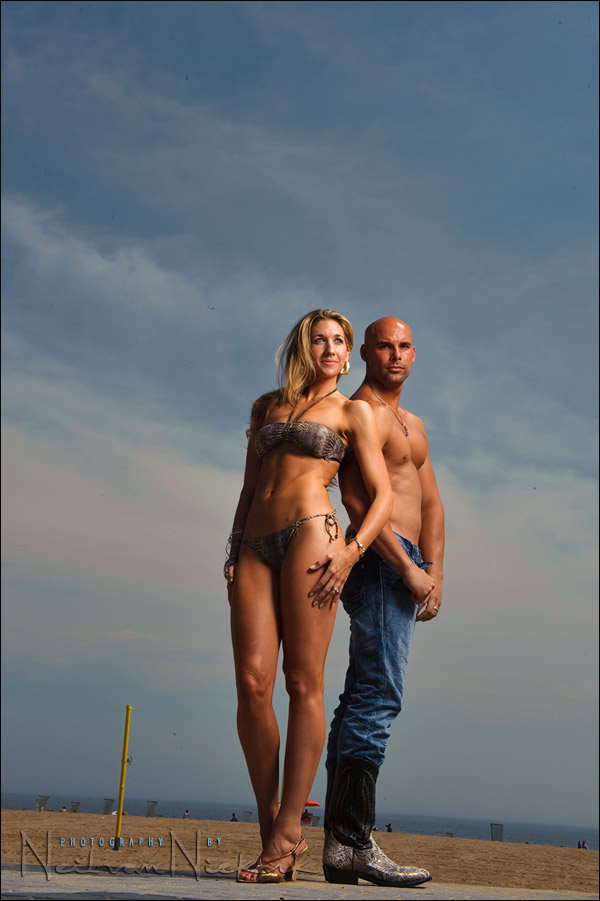
retouching an image in Photoshop
Some might remember the photo session with Sarah and Mark last year. Sarah recently contacted me, saying she wanted to use this image in her portfolio, but it needed some retouching and editing and some details removed. Dust bunnies, an airplane, that yellow pole, random sunbathers .. and her husband, Mark. All preferably edited out for a simpler, more striking image.
About two hours of careful use of the clone tool and healing brush in Photoshop, on various layers, got me to the final image. I also added an action to punch up the colors a bit and that created a subtle vignette with softer corners. Quite a jump from the original!
More about the original photo session, including a video clip of the shoot.
Neil;
This image and your obvious edits bring into question the not-so-obvious edits. Such as, should you have ‘repaired’ her knees?
In portraits of those over a certain age where removal or softening of age indicators would make the image appealing, should these be done? Recently I have been applying reduction of contrast (to remove the harsh effects of light that is being divided by the camera into 5-6 levels as opposed to 10-11 levels which the eye can see) , some softening and only major blemish removal (things that are only on the skin temporarily) as adjustments and therefore, WYSIWYG is the final. Or, should I be creating a ‘manufactured’ image that would be quite unreal? Whether income producing or not, what should be the photographic guideline?: to maintain photographic integrity or please the subject?
Regards, Fred
Fred .. interesting comments.
Where does one stop? Dunno. When time and imagination runs out? Or long before that when the image just seems right?
In this case my edit was guided by what Sarah requested of the image .. but I did add some additional edits to it.
In general, the images on this site don’t see much Photoshop since I want the photos to show what is possible with lighting and with technique, rather than what is possible in terms of juicing up an image afterwards. I really do feel that if you can get the original image as close to perfect quality as you can, you’re far better off than trying to Photoshop a less-than-ideal image.
However, for most of the photos on this site, I do retouch the images for skin blemishes. I don’t think that it is fair to the subject to have every blemish on display in photographs here.
But back to your comment …
As much as I have real admiration for people with incredible Photoshop skillz, my own preference is usually for a fairly straight rendition of the scene. I do want colors that pop a bit, and with enough contrast to give the image some bite. I don’t like flat images as much. But I do think my own photography is fairly straight-forward.
It was a bit of a shock to me, when a number of years ago, I showed one of my favorite wedding images to one of the now-very-prominent California photographers. Her reaction was an immediate, “Needs more Photoshop.” I was surprised because that image already had more Photoshop work done to it than most of my other images. But with hind-sight, I can see what she had meant. The image was dull and lacked impact. (And no, I’m not going to show it here now.)
Conversely, we’ve all seen too many Barbie-like portraits where smoothing plug-ins like Imagenomic Portraiture has been over-used. Yet, done with a certain style and a specific end-result in mind, a highly-processed image can look absolutely beautiful. In fact, I was so impressed with the stylized pin-up photography of Robert Alvarado, that I attended a workshop by Alvarado last year just to learn his lighting and post-production techniques.
So where does one stop? In the end .. it just comes down to personal preference. Hopefully that goes hand-in-hand with a sense of restraint and an artistic sensibility.
Hi Fred,
Looking closely I would say Neil has already carried out some subtle smoothing work on her right knee (our left in the picture)
Neil,
Do you think it’s worth removing the slight halo by the outside of her left knee (our right) generated by the clone content from the right hand side (where you removed Mark) being slightly darker than the original background?
Great work on the retouch, very impressed!
David
PS: I had chance to try a D3S with 70-200 VR II at the ‘Focus on Imaging’ show last week. Wow focus is so fast and precise! It gave me great admiration for how you manage to shoot all day carrying your two D3 bodies and lenses. Gym membership isn’t required when using heavy kit like this! :-)
David .. I could. But .. I also think I’ve invested a lot of time already in the processing of the image. And that’s then where I call a halt to it. :)
Great work here and a beautiful portrait – the original shot was a great couple portrait but the new image really surpasses it. Great quality lighting and great looking image. Always an inspiration…
Stuart
Hi all
In my opinion, portrait retouching is essential – one of the reasons people hire professional photographers. If someone wanted a ‘warts and all’ photograph of themself, then they could just ask a friend to fire a few off with a point and shoot camera.
Image manipulation has been around since the beginning of photographic time. We used to dodge and burn in the darkroom back in the old days and move pieces of paper around under the enlarger while we were exposing the negatives, to produce smooth skin tones. Those slick black and white portraits didn’t just pop out of the camera on their own!
I once read a great comment by another photographer who was debating the issue of portrait retouching. He said that he tries to make the final print look the way the sitter actually sees themself! We all have a false sense of what we really look like – we look into the mirror and our brains selectively arase the parts we don’t like about ourselves! We do the same when we look at other people, especially those we know and love. While talking with people, we don’t look at every wrinkle or age spot on their face(or at least I don’t!). We look and see the beautiful person we know is really there. Cameras can be very unkind, especially these days, with high resolution digital images picking up every blemish and line!
Portrait retouching has to be done with sensitivity and caution – we don’t want to ‘Barbie’ away a person’s true personality – unless you are working in the field of high fashion; then it’s an unfortunate fact that ‘real’ people are not accepted!
Even when an absolutely perfect portrait or fantastic landscape is produced by photographer and camera, I have yet to see a digital image that does not require some sort of basic optimisation – it is just a part of the process, or at least ‘should’ be.
Thanks again for sharing your experience and processes Neil – a generous professional is indeed a rare thing!
Cheers
Pat
what action did you use to punch up the colors?