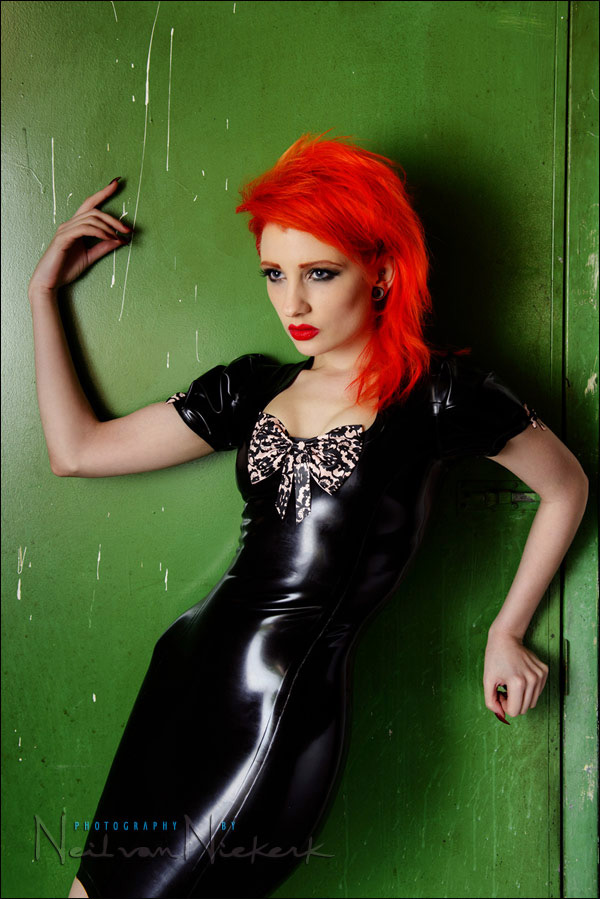
Bounce flash portrait & Photoshop retouching technique
When we were done with the studio shoot with Ulorin Vex, we still had a few minutes left, so I thought I could do a bounce flash portrait as well. Just for a comparison of sorts to show that on-camera bounce flash can give interesting results too. Here is the low-key portraits we did with the Profoto set-up.
The only semi-interesting background I could find in the studio (that wasn’t a white wall), was this grungy green door to one of the store-rooms. I thought it might work as a gritty urban setting. I shot about eight frames in the tight corner, but didn’t like what I saw on the back of my camera, so called it a day. We were done.
Looking through the images again today, cleaning up my hard drives, I hovered over the first image I took and thought it might hold some promise still if I worked it a little bit in Photoshop. Here is where I started …
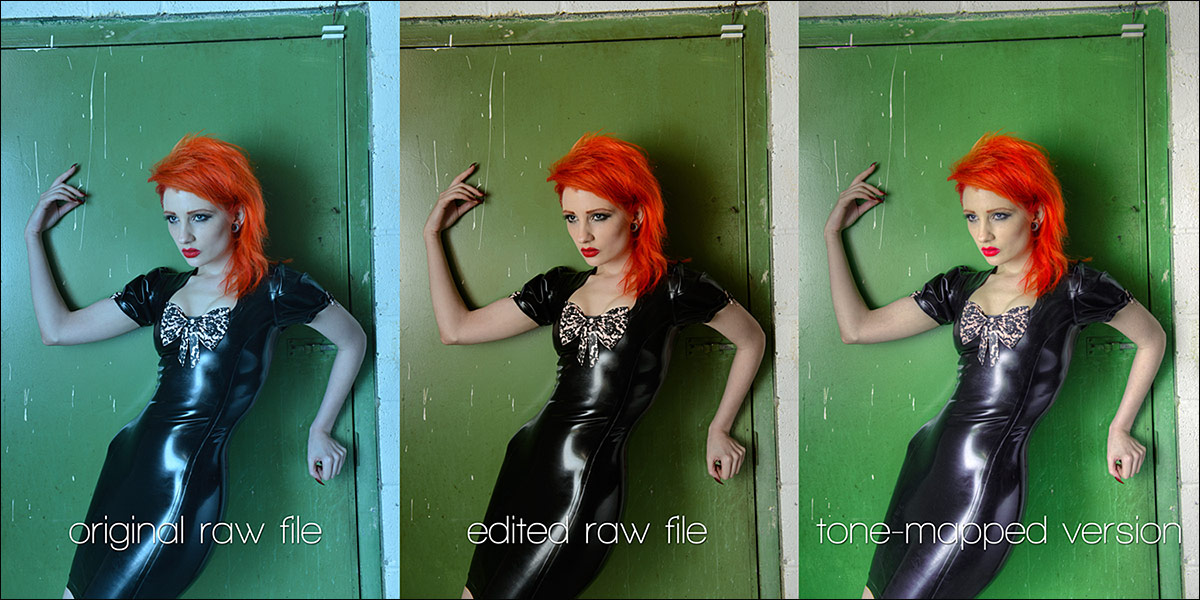
The image on the left is the out-of-camera image. The White Balance was way off, but that wouldn’t be a problem in adjusting the RAW file. The middle version then is the out-of-the-RAW-converter JPG.
I knew I wanted a glossy look to this, so I adjusted my usual post-processing for portraits a little bit.
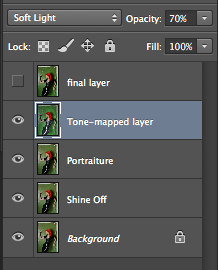
1.) The first step would be retouching for skin blemishes and marks on the door frame that I didn’t want. I mostly use the Healing Brush for this.
2.) I used to use a plug-in called Shine-Off to remove or reduce shiny skin or hot spots on the skin. That plug-in appears to be no more.
Instead now, I use this easy Photoshop method. Even better, is that this method allows you a lot more control and nuanced flexibility than the plug-in did.
3.) Portraiture by Imagenoic
The next step would be to create a duplicate layer of the layer that I ran Shine-Off on. On this new layer, I run Imagenomic’s Portraiture. It is also an essential Photoshop Plug-in. I tend to shy away from keeping the layer at 100% opacity, since Portraiture can make skin look plastic if it is used too aggressively.
With this specific styling of Ulorin Vex on this shoot, there was less need to keep a natural look. We could go a little over-the-top. So I kept this layer at 100%
4.) With the previous example of post-processing for portraits, I used Topaz Adjust as one of the final tweaks.
With this portrait, I wanted to really bring up the colors, and also in some way accentuate some of the detail we might’ve lost with Portraiture.
I decided to use Photomatix, the HDR software, to give a tone-mapped version of the image. This simultaneously flattened the image, and enhanced the details.
I added this version as a Soft-Light layer. (See the screen-capture at the top.)
5.) The final layer is a merged copy of all the other layers, so that I can do a last few tweaks and retouching with the Healing Brush. I also adjusted the Color Balance towards a warmer image.
This entire process could be done with an action, leaving the layers so that they can be adjusted for individual images. And of course, all this is a matter of personal taste. It’s all wide open to interpretation.
For the image at the top, I leveled the image. I never intended for the tilted frame, but was shooting in low light, and cramped into a corner.
I’m a firm believer that it is always better to work on already-strong images in Photoshop, instead of valiantly trying to polish weaker images. But I’d like to think that here I was able to pull a worthwhile image out of meagre beginnings.
More articles about bounce flash photography
- tutorial: bounce flash photography
- bouncing flash
- mimicking window light with flash (model: Ulorin Vex)
- bounce flash technique – mimicking soft window light
Neil,
Great post as always. I’m wondering how the various plugins you use (Topaz Adjust, Shine Off, etc.) compare to your ‘secret sauce’ action set. My feeling is that you use these plugins to enhance the image you obtain from the secret sauce actions, but appreciate any additional info you can provide. Thanks.
Justin
Hi Neil,
Many thanks for a year of amazing insight and much learning.Hope you had a fantastic Christmas and pray next year will be filled with prosperity and good health and many more great insights and Images.
I do have a question for you though. When I shoot functions and groups I often have to shoot at F8 to get a nice sharp image.Once taken I zoom in quite a bit to check the depth of field and sometimes find that all the people are not quite sharp especially when they at different planes.I have noticed over time you don’t always do that.Can you help me on this one?
Regards
Michael
More depth of field = smaller aperture. Not much more to it. Unless your lens is soft towards the edges. That could make you think you don’t have enough DoF.
Hi, Neil. Which picture style do you actually use when you shoot weddings/portraits or when you edit the raw files with camera raw?
Best regards!
Hi there Florian … when you say Picture Style, I assume you’re meaning the Canon’s Picture Styles?
They only have effect if you shoot JPG, or use Canon’s DPP software to edit the RAW files.
They have no effect in Camera RAW / Bridge / Lightroom.
Yes I shoot with Canon but I shoot in Raw and work with Photoshop CS5. When I edit my raw files in Camera Raw, I have the choice between Adobe Standard, camera faithful, camera landscape, camera neutral,camera portrait and camera standard. At the moment I use landscape with reduced saturation in red tones, but I guess there is a better choice for potraits. Which “camera profile” do you use in Camera Raw. I guess that is the name because in the German version of Photoshop it is called Kameraprofil.
Thanks
Florian
aaah, you meant Camera Profile. I use Camera Standard.
Again, wonderful post Neil.
On your recommendation, I have been using Shine off, Portraiture and Topaz for a while now. The effects are subtle, but man do they make a difference!
Take care, D.
Sorry for commenting on an old post.
I started playing with Imagenomic Portraiture for Photoshop recently.
Initially I was skeptical because a lot of similar tools are too aggressive and also affect areas that should remain untouched.
But the latest version is really smart.
Most of the time it selects the correct areas of the image. My gut feel is probably 90% of the time.
However, if you are unhappy with the automatic selection then it is very easy just to override the selection with the eye-dropper tool.
Additionally, it just takes a few seconds to mask off the unwanted areas in Photoshop as well.
A few times the “lowest” setting was a bit too much, then I just lowered the opacity of the layer.
It feels 20 times faster than doing frequency separation manually!
With the trial version you can really experiment with all the features.
The pricing can be a bit of an issue (tax + exchange rate), so it’s maybe best to wait for a discount code.
If you shoot a lot of portraits (especially models/fashion/boudoir, etc.) then this is a really helpful tool.
I know Photoshop now has a skin-smoothing neural filter that works really well, but it only seems to work on faces at the moment, unless you manually edit the mask afterwards. And it currently creates a weird artifact on nostrils.
Good to hear about your experience with Imagenomic Portraiture.